More Coolness...

http://www.yaml.de/en/home.html "Yet Another Multi-Column Layout" - incredible JAVA CSS layout engine. http://www.ohloh.net/p?sort=users&q=training Ohloh - this is an interesting site that examines the open source community projects out there from many different angles. Extremely cool. http://www.olat.org/website/en/html/about_features.html
  • It is open source and therefore free of charge
  • The Java based framework can handle over 700 students simultaneously on one standard Linux server. If you install an OLAT-cluster (available since OLAT 6.1) you can serve even more students!
  • Thanks to its simple and intuitive web frontend, users will learn how to work with OLAT in no time
  • OLAT uses cutting edge AJAX/Web 2.0 technology and the layout is based on the CSS framework YAML
  • It is multilingual (UTF8) and offers translations for over 30 languages. The new translation tool 2009 makes OLAT translation simpler than ever!
  • OLAT supports eLearning standards such as SCORM, IMS Content Packaging or QTI
18 Jun 2009

CSS Layout

Standard Content Elements

Heading Levels

H1 Heading

H2 Heading

H3 Heading

H4 Heading

H5 Heading
H6 Heading

Paragraphs

This is a normal paragraph text. This is a normal paragraph text. This is a normal paragraph text. This is a normal paragraph text. This is a normal paragraph text. This is a normal paragraph text. This is a normal paragraph text. This is a normal paragraph text.

This is a paragraph text with class="highlight". This is a paragraph text with class="highlight". This is a paragraph text with class="highlight". This is a paragraph text with class="highlight". This is a paragraph text with class="highlight".

This is a paragraph text with class="dimmed". This is a paragraph text with class="dimmed". This is a paragraph text with class="dimmed". This is a paragraph text with class="dimmed". This is a paragraph text with class="dimmed".

This is a paragraph text with class="info". This is a paragraph text with class="info". This is a paragraph text with class="info". This is a paragraph text with class="info". This is a paragraph text with class="info".

This is a paragraph text with class="note". This is a paragraph text with class="note". This is a paragraph text with class="note". This is a paragraph text with class="note". This is a paragraph text with class="note".

This is a paragraph text with class="important". This is a paragraph text with class="important". This is a paragraph text with class="important". This is a paragraph text with class="important". This is a paragraph text with class="important".

This is a paragraph text with class="warning". This is a paragraph text with class="warning". This is a paragraph text with class="warning". This is a paragraph text with class="warning". This is a paragraph text with class="warning".


Blockquotes

This is a paragraph text within a <blockquote> element. This is a paragraph text within a <blockquote> element. This is a paragraph text within a <blockquote> element. This is a paragraph text within a <blockquote> element.

Preformatted Text

This is preformatted text, wrapped in a <pre> element. 
This is preformatted text, wrapped in a <pre> element.

Inline Semantic Text Decoration

  • a link tag (<a>) example
  • an italics and emphasize tag (<i>, <em>) example
  • a bold and strong tag (<b>, <strong>) example
  • an acronym and abbreviation tag (<acronym>, <abbr>) example
  • a cite and quote tag (<cite>, <q> ) example
  • a code und variable tag (<code>, <var>) example
  • an inserted and deleted tag (<ins>, <del>) example
  • a keyboard and sample tag (<kbd>, <samp>) example
  • a subscript and superscript tag (<sub>, <sup>) example

Unordered List

  • ut enim ad minim veniam
  • occaecat cupidatat non proident
    • facilisis semper
    • quis ac wisi augue
    • risus nec pretium
    • fames scelerisque
  • nostrud exercitation ullamco
  • labore et dolore magna aliqua
  • aute irure dolor in reprehenderit in voluptate velit esse cillum dolore

Ordered List

  1. ut enim ad minim veniam
    1. facilisis semper
    2. quis ac wisi augue
    3. risus nec pretium
    4. fames scelerisque
  2. occaecat cupidatat non proident
  3. nostrud exercitation ullamco
  4. labore et dolore magna aliqua
  5. aute irure dolor in reprehenderit in voluptate velit esse cillum dolore

Definition List

A definition list — this is <dt>
A definition list — this is <dd> element. A definition list — this is <dd> element. A definition list — this is <dd> element. A definition list — this is <dd> element.
A definition list — this is <dt>
A definition list — this is <dd> element. A definition list — this is <dd> element. A definition list — this is <dd> element. A definition list — this is <dd> element.
A definition list — this is <dt>
A definition list — this is <dd> element. A definition list — this is <dd> element. A definition list — this is <dd> element. A definition list — this is <dd> element.

Text & Images

dummy image

Lorem ipsum dolor sit amet, consetetur sadipscing elitr, sed diam nonumy eirmod tempor invidunt ut labore et dolore magna aliquyam erat, sed diam voluptua. At vero eos et accusam et justo duo dolores et ea rebum. Stet clita kasd gubergren, no sea takimata sanctus est Lorem ipsum dolor sit amet. Lorem ipsum dolor sit amet, consetetur sadipscing elitr, sed diam nonumy eirmod tempor invidunt ut labore et dolore magna aliquyam erat, sed diam voluptua. At vero eos et accusam et justo duo dolores et ea rebum.

Duis autem vel eum iriure dolor in hendrerit in vulputate velit esse molestie consequat, vel illum dolore eu feugiat nulla facilisis at vero eros et accumsan et iusto odio dignissim qui blandit praesent luptatum zzril delenit augue duis dolore te feugait nulla facilisi. Lorem ipsum dolor sit amet, consectetuer adipiscing elit, sed diam nonummy nibh euismod tincidunt ut laoreet dolore magna aliquam erat volutpat.


dummy image

Lorem ipsum dolor sit amet, consetetur sadipscing elitr, sed diam nonumy eirmod tempor invidunt ut labore et dolore magna aliquyam erat, sed diam voluptua. At vero eos et accusam et justo duo dolores et ea rebum. Stet clita kasd gubergren, no sea takimata sanctus est Lorem ipsum dolor sit amet. Lorem ipsum dolor sit amet, consetetur sadipscing elitr, sed diam nonumy eirmod tempor invidunt ut labore et dolore magna aliquyam erat, sed diam voluptua. At vero eos et accusam et justo duo dolores et ea rebum.

Duis autem vel eum iriure dolor in hendrerit in vulputate velit esse molestie consequat, vel illum dolore eu feugiat nulla facilisis at vero eros et accumsan et iusto odio dignissim qui blandit praesent luptatum zzril delenit augue duis dolore te feugait nulla facilisi. Lorem ipsum dolor sit amet, consectetuer adipiscing elit, sed diam nonummy nibh euismod tincidunt ut laoreet dolore magna aliquam erat volutpat.


Lorem ipsum dolor sit amet, consetetur sadipscing elitr, sed diam nonumy eirmod tempor invidunt ut labore et dolore magna aliquyam erat, sed diam voluptua. At vero eos et accusam et justo duo dolores et ea rebum. Stet clita kasd gubergren, no sea takimata sanctus est Lorem ipsum dolor sit amet.

dummy image

Lorem ipsum dolor sit amet, consetetur sadipscing elitr, sed diam nonumy eirmod tempor invidunt ut labore et dolore magna aliquyam erat, sed diam voluptua. At vero eos et accusam et justo duo dolores et ea rebum.


Text & Images with Captions

dummy imageFig. 1: Sample caption for this beautiful dummy image.

Lorem ipsum dolor sit amet, consetetur sadipscing elitr, sed diam nonumy eirmod tempor invidunt ut labore et dolore magna aliquyam erat, sed diam voluptua. At vero eos et accusam et justo duo dolores et ea rebum. Stet clita kasd gubergren, no sea takimata sanctus est Lorem ipsum dolor sit amet.

Duis autem vel eum iriure dolor in hendrerit in vulputate velit esse molestie consequat, vel illum dolore eu feugiat nulla facilisis at vero eros et accumsan et iusto odio dignissim qui blandit praesent luptatum zzril delenit augue duis dolore te feugait nulla facilisi. Lorem ipsum dolor sit amet, consectetuer adipiscing elit, sed diam nonummy nibh euismod tincidunt ut laoreet dolore magna aliquam erat volutpat.

Ut wisi enim ad minim veniam, quis nostrud exerci tation ullamcorper suscipit lobortis nisl ut aliquip ex ea commodo consequat. Duis autem vel eum iriure dolor in hendrerit in vulputate velit esse molestie consequat, vel illum dolore eu feugiat nulla facilisis at vero eros et accumsan et iusto odio dignissim qui blandit praesent luptatum zzril delenit augue duis dolore te feugait nulla facilisi.


dummy imageFig. 2: For captions that are longer than one line, you have
to define a width for the icaption classes in your
content.css or include line-breaks (<br/>) manually.

Lorem ipsum dolor sit amet, consetetur sadipscing elitr, sed diam nonumy eirmod tempor invidunt ut labore et dolore magna aliquyam erat, sed diam voluptua. At vero eos et accusam et justo duo dolores et ea rebum. Stet clita kasd gubergren, no sea takimata sanctus est Lorem ipsum dolor sit amet.

Stet clita kasd gubergren, no sea takimata sanctus est Lorem ipsum dolor sit amet. Lorem ipsum dolor sit amet, consetetur sadipscing elitr, sed diam nonumy eirmod tempor invidunt ut labore et dolore magna aliquyam erat, sed diam voluptua. Duis autem vel eum iriure dolor in hendrerit in vulputate velit esse molestie consequat, vel illum dolore eu feugiat nulla facilisis at vero eros et accumsan et iusto odio dignissim qui blandit praesent luptatum zzril delenit augue duis dolore te feugait nulla facilisi. Lorem ipsum dolor sit amet, consectetuer adipiscing elit, sed diam nonummy nibh euismod tincidunt ut laoreet dolore magna aliquam erat volutpat. At vero eos et accusam et justo duo dolores et ea rebum. Stet clita kasd gubergren, no sea takimata sanctus est Lorem ipsum dolor sit amet.

Ut wisi enim ad minim veniam, quis nostrud exerci tation ullamcorper suscipit lobortis nisl ut aliquip ex ea commodo consequat. Duis autem vel eum iriure dolor in hendrerit in vulputate velit esse molestie consequat, vel illum dolore eu feugiat nulla facilisis at vero eros et accumsan et iusto odio dignissim qui blandit praesent luptatum zzril delenit augue duis dolore te feugait nulla facilisi.


Tables

table 1: this is a simple table with caption
table heading
column 1 column 2 column 3
subhead 1 dummy content dummy content
subhead 2 dummy content dummy content
subhead 3 dummy content dummy content


table 2: this is a table with class="full"
table heading
column 1 column 2 column 3
subhead 1 dummy content dummy content
subhead 2 dummy content dummy content
subhead 3 dummy content dummy content

18 Jun 2009

Cool sites from today

http://www.seobook.com/ "Seo Book is different. We focus our training program on how to grow your presence. Our tagline Learn. Rank. Dominate. matches our approach to teaching SEO. " http://htmlpurifier.org/ "HTML Purifier is a standards-compliant HTML filter library written in PHP. HTML Purifier will not only remove all malicious code (better known as XSS) with a thoroughly audited, secure yet permissive whitelist, it will also make sure your documents are standards compliant, something only achievable with a comprehensive knowledge of W3C's specifications. " http://drupal.org/project/render "This module provides an easy, user-friendly administrative interface for quickly implementing rendering rules for various technologies depending on Cascading Style Sheets (CSS) and/or Javascript (JS) on any Drupal site without requiring any adjustments to the site's theme."
17 Jun 2009

recent connection failures

We've had some issues recently, so I wanted to apologise for those and tell you that they are now resolved (or so my service provider tells me...) here is a history for the last few weeks - look what a bad cable can do to your reliability! This report is thanks to a free website uptime monitor from www.basicstate.com
JaxBeachtech.com connection failures:
Start ,  End, ??,   Ping failure count,  Current Status                  
2009-05-16 15:09    2009-05-16 15:10       0       1  resolved
2009-05-18 13:27    2009-05-18 13:43       0      16  resolved
2009-05-24 16:33    2009-05-24 21:50       0     317  resolved
2009-05-24 22:06    2009-05-25 12:07       0     841  resolved
2009-05-25 13:27    2009-05-25 16:05       0     158  resolved
2009-05-25 16:37    2009-05-25 17:40       0      63  resolved
2009-05-26 01:21    2009-05-26 03:12       0     111  resolved
2009-05-26 16:26    2009-05-26 16:58       0      32  resolved
2009-05-28 18:13    2009-05-28 18:29       0      16  resolved
2009-05-29 15:22    2009-05-29 15:54       0      32  resolved
2009-05-29 18:33    2009-05-29 23:34       0     301  resolved
2009-05-31 15:46    2009-05-31 16:18       0      32  resolved
01 Jun 2009

It begins - how Google can grow beyond Microsoft's wildest nightmares...

I have often wondered when Google would begin to develop an alternative to the windows platform - something for the rest of us... But it is already out there in plain sight - just smuggled under the radar in the form of a "phone operating system". Take a look at this post from Engadget - there is a video clip of a "smartbook" - an ASUS Eee PC prototype running google's "Android" on a 1GHz Snapdragon chipset. It is incredible, and the power use is so low that they didn't need to include a fan... http://tinyurl.com/nqye48 Make sure you watch the video clip to get an idea of the performance:
01 Jun 2009

IT Security Standards ISO/IEC 27002

Assembling a security policy can be a difficult task without guidance. The International Organization for Standardization (ISO) published a security standard called ISO/IEC 27002. This document refers to information technology related security issues and outlines a code of practice for IT security management. ISO/IEC 27002 provides a guideline for developing organizational security standards and security management practices.

The ISO 27002 document consists of 12 sections:
  1. Risk assessment
  2. Security policy - management direction
  3. Organization of information security - governance of information security
  4. Asset management - inventory and classification of information assets
  5. Human resources security - security aspects for employees joining, moving and leaving an organization
  6. Physical and environmental security - protection of the computer facilities
  7. Communications and operations management - management of technical security controls in systems and networks
  8. Access control - restriction of access rights to networks, systems, applications, functions and data
  9. Information systems acquisition, development and maintenance - building security into applications
  10. Information security incident management - anticipating and responding appropriately to information security breaches
  11. Business continuity management - protecting, maintaining and recovering business-critical processes and systems
  12. Compliance - ensuring conformance with information security policies, standards, laws and regulations

Within each section, information security controls and their objectives are specified and outlined. The information security controls are regarded as a best practice means of achieving those objectives. For each of the controls, implementation guidance is provided. Specific controls are not mandated since:

  1. Each organization is expected to undertake a structured information security risk assessment to determine its requirements before selecting controls that are appropriate to its specific circumstances. The introduction section outlines a risk assessment process although there are more specific standards covering this area such as ISO/IEC 27005.
  2. Industry-specific implementation guidelines for ISO/IEC 27002 are designed to advise organizations in the telecomms, financial services, healthcare and legal industries.
26 May 2009

European open source adoption - Forrester Report

See: tdwi.org
Promo
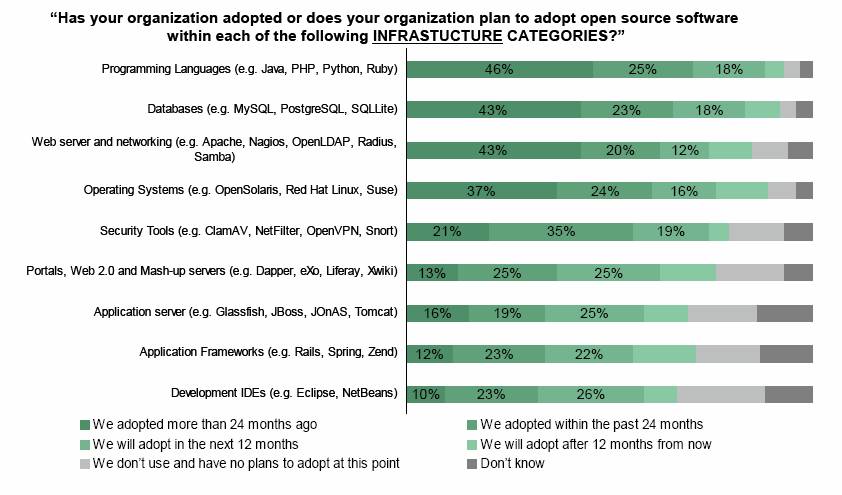
A recently released survey report on OSS adoption in large European companies tracks some very interesting trends. The Executive summary included this:

"In October 2008, Bull commissioned Forrester Consulting to evaluate the upcoming paradigm change of open source software enterprise adoption. In conducting in-depth interviews with 132 senior business and IT executives from large companies that are using open source products, Forrester found that these companies are embracing a fundamentally different understanding of software."
20 May 2009

Emergency repair options for XP/2000

From: http://www.windowsnetworking.com/articles_tutorials/Troubleshooting-Startup-Problems.html

Troubleshooting is merely the methodical application of common sense and technical knowledge to the inevitable problems that crop up in a fallen world. If common sense can be codified (and perhaps it can with AI) then it starts with answers to simple questions like: Why? How? What? In this article I'll try to distill the issues, tools and procedures of troubleshooting Windows XP/2003 boot problems into a small amount of easily digestible information that you as a system administrator can write on the back of a note card or store in your PDA for easy access when the proverbial poop hits the fan. Let's begin with the Why question.

Why do startup problems happen?

Windows may fail to start for a variety of reasons, and generally speaking in order of decreasing likelihood here they are:

  • Hardware failure
  • Bad driver
  • Corrupt file or volume
  • System misconfiguration
  • Virus infection

Let me elaborate. A common reason systems fail to start is because some element of the system's hardware has failed. This could range from the simple (someone kicked the power cord out of its socket) to the obvious (smoke emitting from the machine) to the mysterious (something transient that happens only when the moon is full or during sunspot minimum). Next most common is when you update the driver for some piece of hardware (or the BIOS for that matter) and the system won't boot afterwards. After that comes those mysterious messages we'll talk about shortly that usually indicate some key operating system file has somehow become corrupt or gone missing. Misconfiguration is another possible source of boot problems, but this is somewhat rare as in most cases you'll still be able to boot but one or more services may fail to start or your applications may not function as expected. Finally, virus infection can cause a system to fail to boot, but I've listed this in last place because I'm assuming you've got an antivirus solution in place and you're keeping the antivirus signature files updated, right?

Now that we know why Windows may fail to start properly, let's ask the logical next question: How can we know which of these underlying causes is the one that might be preventing Windows from successfully booting?

How to diagnose startup problems

Here is where we need to apply our brains and use a bit of common sense to determine what the cause of startup failure might be. Think of the previous list above as a list of disease-causing viruses, and now you have to play doctor and figure out which virus the patient (your sick computer) actually might have. For if you skip this step and try blasting the patient with every possible remedy in your doctor's bag, two things may happen:

  • One of the remedies you try may actually make the patient worse and indeed could prove fatal.
  • You'll waste a lot of time and the recovery of your patient will be delayed, and your boss may get upset with you as a result since her business is losing money due to downtime.

So careful diagnosis is a step you should always take time for and never avoid, and just like in the medical profession such diagnosis usually begins with your senses. For example, do you smell something burning? Better unplug your system immediately and wait for things to cool off, then open the case and inspect the damage. Do you hear your CPU fan making a slow grinding sound? Power down your system and replace the fan before your processor burns out and needs replacing. Is your video display flickering? Maybe try reseating the video card after checking if the video cable is seated properly.

OK let's assume its not such a simple and obvious problem. Instead, say you get a black screen with one of the following dreaded messages when you try and boot your system:

  • "NTLDR is missing"
  • "A disk read error occurred"
  • "Invalid partition table"
  • "Error loading operating system"
  • "Could not read from selected boot disk"
  • "Windows could not start because the following file is missing or corrupt"

Or you might get a blue screen (called a STOP screen) with some obscure message on it. Or if you're lucky you might make it all the way through the Windows splash screen to the logon box and then suddenly get a dialog box saying "One or more services failed to start". Or your mouse pointer might freeze and your system hang either before or immediately after logon. How can you match these symptoms to the underlying condition that might be causing them? First let's look at some possible "black screen" messages that can occur after the BIOS POST routine finishes but before the Windows splash screen appears:

Symptom

Probable Cause

  • "Invalid Partition Table"
  • "Missing Operating System"
  • "Invalid Partition Table"

Master boot record is corrupt due to hard disk errors or virus infection

  • "NTLDR is missing"
  • "A disk read error occurred"
  • System hangs after BIOS POST finishes

Boot sector is corrupt due to hard disk errors or virus infection

  • "Windows could not start because of a computer disk hardware configuration problem"
  • "Could not read from selected boot disk"
  • "Check boot path and disk hardware"

Boot.ini file is corrupt, missing, or needs updating.

  • "Windows could not start because the following file is missing or corrupt"

Boot volume is corrupt or the referenced system file is missing.

In addition to these error messages, a variety of other startup problems can occur including:

  • Blue screens. These are typically caused by hardware failure or driver problems but can also be due to virus infection.
  • Hung system. These are typically caused by buggy drivers or by registry corruption but can also be due to virus infection.
  • Dialog box saying "One or more services failed to start". This is typically caused by misconfiguration or registry corruption but can also be caused by application incompatibility of some form.

So what should you do to resolve such problems?

How to resolve startup problems

Like a doctor's mysterious black medical bag full of medical instruments (at least in old movies on TV) the system administrator also has a set of tools provided by Microsoft for resolving startup problems like the ones in the table above. In a nutshell, here's a quick inventory of the main tools:

  • Last known good. Restores the HKLM\System\CurrentControlSet portion of the registry its version during the last successful logon to the system.
  • Safe mode. Starts Windows with a minimal set of drivers and creates a record of which drivers load in %windir%\Ntbtlog.txt.
  • System Restore. Windows XP only feature to restore system to previously saved configuration.
  • Recovery Console. Boots to a command line that allows you to run various commands, see this article by Johannes Helmig for more info.
  • Automated System Recovery (ASR). Restores the boot volume from backup, see this article by Johannes Helmig for more info.
  • Repair. Run Windows Setup from your product CD and select the option to try and repair your installation.

Which tool should you use to address each of the symptoms we described earlier? Assuming there is no obvious hardware problem (no funny smell) and you've already asked yourself the Golden Question ("What was the last thing I did to this system?") then here's a quick outline that maps the type of knife (may be several in order of severity) to the kind of surgery (underlying problem or visible symptom) you need to perform on your system:

Problem/Symptom

Tool(s) to Use

Corrupt master boot record

Recovery Console (fixmbr)

Corrupt boot sector

Recovery Console (fixboot)

Corrupt or missing boot.ini

Recovery Console (bootcfg /rebuild)

Corrupt system file

Recovery Console (chkdsk)
Restore from ASR backup
Perform a Repair install

Corrupt registry

Recovery Console (chkdsk)
System Restore (XP only)
Restore system state from backup
Perform a Repair install

Blue screen

See this resource first
Last known good
System Restore (XP only)
Safe mode (roll back suspect driver using Device Manager)

Hung system

Last known good
System Restore (XP only)
Safe mode (roll back suspect driver using Device Manager)

"One or more services failed to start"

Don't logon! Reboot and select last known good, log on, undo the last configuration steps you performed.
Safe mode (undo last configuration steps you performed)


Conclusion

A good physician understands diseases, can recognize their symptoms, and knows how best to treat them. Fortunately if you toast your system while trying to repair a startup problem, you can always buy another. But by using a combination of common sense and an understanding of the causes of, symptoms of, and tools for treating startup problems, you can usually bring your systems back to perfect health and earn your pay as a system administrator!

28 Apr 2009

Linux backup options

I myself use this low-level-we-need-the-command-line-for-this method: http://linuxmint.com/forum/viewtopic.php?t=3969 Or: Take a look here .... the backup tool they discuss there is called "hubackup" and you can install it via "Synaptic": https://wiki.ubuntu.com/HomeUserBackup http://ubuntuforums.org/showthread.p...89#post3795689
25 Apr 2009

HP DL380 Linux Drivers

HP Proliant DL380 G3, HP diagnostic/configuration tools Well.. I was surfing around trying to figure out an easy way to configure and diagnose the SCSI Smart Array 5i Plus that came with my server. It turns out HP does include some software for Debian which might be useful for us. For the sake of making these files public so that more people (who are much better at this than myself) can use and try these files out, here is a list of what I have found. Please if you find any use of these files, post up some information for others.

Installation Information for Debian Etch 4.0 (i386)
https://h20392.www2.hp.com/portal/sw...umber=T8570AAE

Installation Information for Debian Etch 4.0 (AMD64/EM64T)
http://h20392.www2.hp.com/portal/swd...umber=T8569AAE


On the bottom of that page, you can 'receive for free' the following files:


Additional product information
Product #: T8570AAE
Version: Debian 4.0 (Etch)
Software specification: hpasm-7.8.0-100.etch26.i386.deb
hp-OpenIPMI-7.8.0-108.etch26.i386.deb
hprsm-7.8.0-103.etch26.i386.deb
cmanic_7.9.0-5b.etch_i386.deb
hpsmh-2.1.7-167.debian.i386.deb
cpqacuxe-7.80-4.linux.deb
hpacucli-7.80-3.linux.deb
hpadu-7.80-4.linux.deb

Additional product information
Product #: T8569AAE
Version: Debian 4.0 (Etch)
Software specification: hpasm-7.8.0-91.etch26.amd64.deb
hp-OpenIPMI-7.8.0-108.etch26.amd64.deb
hprsm-7.8.0-104.etch26.amd64.deb
cmanic_7.9.0-5b.etch_amd64.deb
hpsmh-2.1.7-167.debian.amd64.deb
cpqacuxe-7.80-4.linux.deb
hpacucli-7.80-3.linux.deb
hpadu-7.80-4.linux.deb

Fill out the information and download the files.

You may also need this:
http://packages.ubuntu.com/gutsy/i38...bc2.2/download

Good luck. I am going to try to install these on my server, per HP's instructions and see what happens.

Reference: http://www.zabbix.com/forum/showthread.php?p=35469
http://ubuntuforums.org/showthread.p...ht=hp-OpenIPMI 2 Weeks Ago at 11:09 PM.. Reason: Adding AMD64/EM64T Re: HP Proliant DL380 G3, HP diagnostic/configuration tools I ran into the same problem with a DL380 G4 and found that the "Lenny" (5.0) distributables provided on ISO work great with Ubuntu 8.10 i've installed the amd64T version of the HP tools and the only package I needed for the tools wat "libc6-i386". hope this helps good luck
14 Apr 2009
Subscribe to